

Today I'll share some points that I've learned while playing with Spark, Parquet and the Delta format. Even if you don't use these technologies, I hope you can spot some neat ideas to reuse somewhere else later.
I like to picture in my head that the most important architectural distinction between a datalake table and a typical database (like Postgres) is that compute and storage are handled very separately: the table's data is stored in one distributed system (typically a cloud object storage), while another distributed system (or even multiple ones) read and write to those files that compose the table.
There are competing formats to represent these tables, with distinct trade-offs of course: Delta, Iceberg, Hudi. But from my research, I don't think there is anything fundamentally different between then. This post will focus on Delta, but most of it should be easily transposable for the others.
I like to understand technical solutions by framing the fundamental problems that they aim to solve best, so I'll present it like that. Just remember that, although I have read the specification and have used Spark with Delta tables for years, I didn't invent any of this: I'm just an outside observer who can be wrong. If you spot a misconception, please tell me in the comments!
How it solves its main challenges
Very large tables: pruning files
The Delta format (and datalakes in general) aims to work effectively with very large tables, with petabytes of data over trillions of rows. To allow for this, the data is divided into multiple files which are themselves divided in chunks. The format then has ways to drastically reduce how many files and how much of these files need to be accessed in order to answer queries.
To cut early which files are read, Delta keeps track of some simple statistics about each column in each file: number of nulls, maximum and minimum value. To give a concrete example, let's explore a very simple Delta table made of 3 files:
my-table/_delta_log/00000000000000000000.jsonmy-table/part-00000-0d56d77a-f779-46e3-adf2-7eaa14656c20-c000.zstd.parquetmy-table/part-00000-a6ac1d2e-304a-465e-b549-ccc442aa3855-c000.zstd.parquet
The .parquet files contain the actual rows' data, but put them aside for now: we'll talk about them in a minute.
The _delta_log/00000000000000000000.json file is a JSON-lines file that describes the table itself. It has a funny
name (not judging!), but you can imagine that it's somehow linked to history and evolution of the table. In it, each
parquet file that constitutes the table has a record like this:
{
  "add": {
    "path": "part-00000-0d56d77a-f779-46e3-adf2-7eaa14656c20-c000.zstd.parquet",
    "partitionValues": {},
    "size": 1040477,
    "modificationTime": 1778102420000,
    "dataChange": true,
    "stats": "{\"numRecords\":10,\"minValues\":{\"id\":0,\"name\":\"gz ovkfgoconqkwxf alpdjfuk rqvvb\",\"edition\":12},\"maxValues\":{\"id\":9,\"name\":\"zulxlljs fizl qtivsko dkb\",\"edition\":90},\"nullCount\":{\"id\":0,\"name\":0,\"edition\":0,\"days\":0,\"games\":0,\"editors\":0,\"visitors\":0}}"
  }
}
Look who's there: stats! It's a JSON inside a JSON, why not... Here, I'll format it so we can take a closer look:
{
  "numRecords": 10,
  "minValues": {
    "id": 0,
    "name": "gz ovkfgoconqkwxf alpdjfuk rqvvb",
    "edition": 12
  },
  "maxValues": {
    "id": 9,
    "name": "zulxlljs fizl qtivsko dkb",
    "edition": 90
  },
  "nullCount": {
    "id": 0,
    "name": 0,
    "edition": 0,
    "days": 0,
    "games": 0,
    "editors": 0,
    "visitors": 0
  }
}
Cool! So it has 10 rows, id is between 0 and 9, name is between "gz ovkfgoconqkwxf alpdjfuk rqvvb" and "zulxlljs
fizl qtivsko dkb", no column has any null.
This is a silly example, but in a more realistic data and query it can be very handy. Say you're doing
select *
from my_table
where created_at > '2026-01-01'
A Delta-compatible engine will read the 00000000000000000000.json file to extract the list of all files, then use
the statistics to decide which files are even worth considering.
But to be frank, I was somewhat shocked that the statistics are so simple (just max, min and null count)! If the column you're searching on has naturally a similar range in all files (for example, it's a UUID v4, product name or event kind), it seems to me that this file pruning will be much less effective. The Delta format has no such concept of "indexes" as other databases have. Also, it surprised me that columns with array of structs don't get statistics at all!
Very large tables: reading less data
Delta uses the parquet format to store the rows. Parquet is pretty neat. If you have time to spare, go and read the summary on the project's page. For our discussion right now, you only have to know that parquet divides the table horizontally into "row groups" and that, in each row group, the data for each column is stored sequentially. The end of the file contains a footer with the metadata and offsets for each column in each row group:
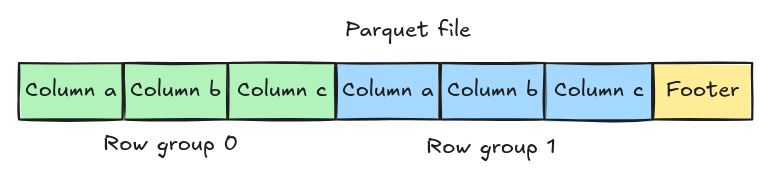
So instead of reading each file in full, the Delta engine first reads only the footer; then depending on the queried columns it reads only the segments of the file that are of interest. This is very important for datalake tables, since the files are usually stored in a separate cloud service.
Small parenthesis here: this separate cloud service is usually a "dumb" object storage, but it's extra cool when you realise that it can be something much more refined! For example, it can be a service that implements authorisation over which columns the requesting user can access to protect sensitive information.
Let's take a train back to the statistics of the columns. While the Delta format keeps some very simple statistics as part of the JSON file that links each parquet file to the table, the parquet itself is more sophisticated! First, because it does so per row group. Second, because it can store the list of unique values (if it's small) or a bloom filter (if there are many distinct values).
Very large tables: distributed reading
That's easy: the table is split into multiple parquet files, each one may be further broken down in row groups. Each row group can be handled independently, so a distributed system (say a cluster with many machines and cores) can divide the work to reduce total processing time.
Consistent data schema and schema evolution
A typical use case for datalake tables is to keep a history of multiple months or even years of data. Just like a SQL database like Postgres, each table has a schema (set of column names and types), which has to be migrated as the underlying data evolves. However, unlike Postgres, the allowed changes in the schema are designed so that historical data (that is, old parquet files) don't need to be rewritten.
In practice, in the example table above the 00000000000000000000.json file also contains a record like:
{
  "metaData": {
    "id": "6a8b2481-493a-4796-a77d-ed5e1b70a1e1",
    "format": {
      "provider": "parquet",
      "options": {}
    },
    "schemaString": "{\"type\":\"struct\",\"fields\":[...]}",
    "partitionColumns": [],
    "configuration": {},
    "createdTime": 1778102418300
  }
}
Yes, another JSON in a JSON in schemaString.
Any evolution to the schema will produce a new metaData record with the full updated schema.
So that no previous parquet file needs to rewritten, Delta only allows:
- adding a new column: reading a previous parquet file will assume
nullfor it - removing a column: the data is left in previous parquet files, but no longer visible for the engine
- changing the order of a column: it's just superficial
- some specific change of types, called type "widening": readers have to convert on the fly as needed
- renaming a column: requires "column mapping"
This last one is the most complex one and has to be enabled in more recent Delta versions. With this, the name of the column in the parquet files is just a UUID. The Delta metadata in the JSON file then maps each UUID to a user-visible column name.
The schema string is quite large, and it has to be repeated in its entirety every time it evolves. I guess for most tables that's negligible, but we can imagine a pathological case for tables with thousands of columns that evolve frequently.
Append data
Many use cases of Delta tables require adding more data to it in batches, usually by some automatic ingestion pipeline every hour or day. Delta deals with this by versioning the table and splitting the operation into two distinct steps:
- write new parquet files
- commit the new version
The first step can take an arbitrarily long time, and multiple concurrent writers can do this at the same time. Crucially, these new files are "dangling" so far and no reader can see them.
The second step has to be done atomically by writing a new versioned file with the next version number. In our examples
above, it would be 00000000000000000001.json. All these JSON files have to be read and merged in sequence by future
readers.
Delta uses "optimistic" concurrency. To illustrate, when two writers work in parallel they can do step 1 at their own pace, but will have to serially do step 2. In the example below, writer 1 commits first, so writer 2 has to check that what writer 1 has done does not conflict with its work, then commit. For appending data that's usually fine, but for updates it may require writer 2 to start over.
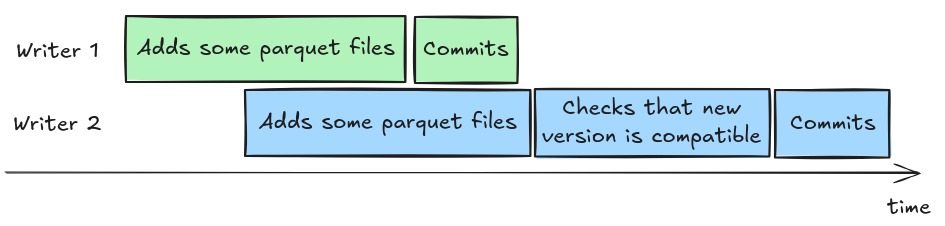
However, note how this architecture has one great weakness: each addition requires writing a new parquet file then commiting a new version. Also, every future reader has to read all the small JSON files to glue them all together. So Delta is a catastrophic format if you want to do multiple updates every second!
To mitigate the ever-increasing number of JSON files to read, the writer may decide to compact the history. For example:
my-table/_delta_log/00000000000000000000.json
my-table/_delta_log/00000000000000000001.json
my-table/_delta_log/00000000000000000002.json
my-table/_delta_log/00000000000000000003.json
my-table/_delta_log/00000000000000000004.json
can be compacted as
my-table/_delta_log/00000000000000000004.json
my-table/_delta_log/00000000000000000004.checkpoint.parquet
The .checkpoint.parquet file containing the add entries of all versions so far, and the .json file containing only
the last metaData entry.
Delete and update data
Delta represents "removed" data without actually removing them 😜. It uses "delete vector": a new binary file that describes which rows in the parquet files should be considered removed.
Again, this produces a new version with a delete entry, and the same optimistic concurrency model and compaction logic
described above apply.
Delta can update data by either producing a delete followed by an add in the same version, or using a dedicated
cdc (which stands for change data capture). I could not learn enough about the CDC feature, so I'll not try to explain
it here.
Optimisation and clean-up
As you may imagine, as the table evolves due to writes, the data may become too much fragmented and removed data no
longer accessible by readers still taking space, etc. A Delta engine implements a VACCUM and OPTIMIZE commands to
rewrite recently added and modified parquet files.
There's a sweet spot: too many parquet files bring a lot of metadata overhead, too few don't allow enough parallelism.
Also, newer implementations sort and divide the rows in the row groups and parquet files to improve the relevance of the column statistics for file and row-group pruning. They've named this feature "liquid clustering", which my brain finds too much marketing-y.
That's all for now, thanks for reading!
Delta is a pretty neat format that solves some hard problems not with magic, but with a bunch of JSON and parquet files. At the same time, its design also brings some major pain points... I hope that you've learned something new, 'cause I certainly did.
Leandro at 2026-05-08 00:41 UTC
Nice, I've learned a lot from this post, thank you!
answer
❤️
answer