

Automated backups that work are mind-liberating! I'll share in this and the next post how I've solved it for my use case in my homelab.
In this first post I want to explain my goals and my overall setup. In the next post I'll explore in detail how I handle encryption. I'd also love to hear how you handle your backups: share in the comments.
What does my system solve?
I like to think of my backup system in terms of the thread model against the chaos and karma of the world. Which kinds of problems do I want to be protected against? After showering a couple of times, I informally had a list on my head. Here it is, transcribed:
- if I do something dumb, like deleting all my photos by accident, I want to recover that data (true story: when migrating from Google Photos to Nextcloud, I've removed the wrong folder 😇).
- if my machine breaks, I want to recover my data
- if my house catches fire, is looted, or transforms itself into a pumpking (not true story), I want to recover my data
- if a stranger has access to any of the disks, they must not be able to access my data
- if ransomware compromises my server, they cannot erase my backups
- if I'm not available or just lazy, the system should mostly continue to work
- if the system has problems, I should be notified
- if the system silently stops running, I should notice
- if in-disk data is inconsistent while the owner app is running, it must be stopped to flush the data
- if a copied file gets corrupted or rots, it should be identified
- if the writing patterns on the disks are similar, they should not fail at the same time due to correlated wear and tear
I have also set two personal challenges: I want a cheap solution, and I don't want to use no cloud!
To reduce complexity, I've decided that the following properties are not necessary for me. But read carefully, you may disagree:
- high availability: I'm okay with shutting down my apps and databases for a while, to ensure a consistent state. Postgres' documentation recommends doing this for file-level backups.
- continuous backup: I'm okay with my backup running once a day. This means that losing data created on the same day is possible.
- point in time recovery: I'm okay with having just two backups (daily and monthly). This means that losing data if I don't notice a problem in the same day is possible.
The system overview
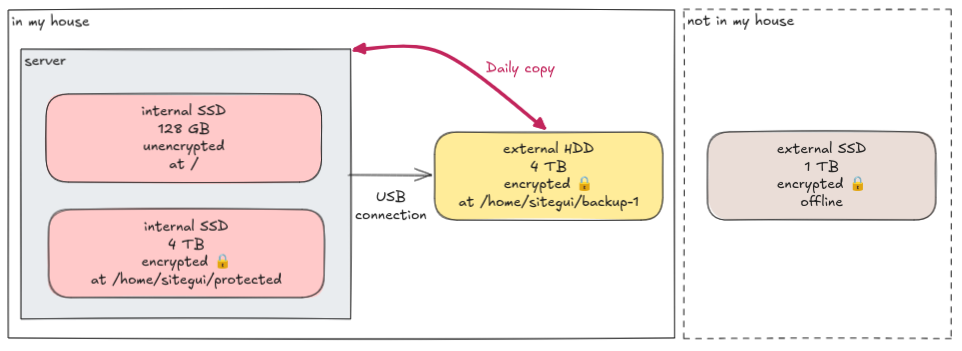
My server is an old laptop that has two internal SSDs:
- a large 4 TB with most of my apps and their data. This disk is fully encrypted.
- a small 128 GB with the OS and some critical components. It's left unencrypted so that the machine can boot and provide a small web UI that I use to remotely type in the password of the encrypted disk.
Connected to it by USB, an external HDD. Every night, a systemd timer runs the backup logic that mounts, copies the data, and unmounts it.
Stored in a drawer somewhere else, another external disk, this time an SSD. Every month, I physically exchange these two external disks:
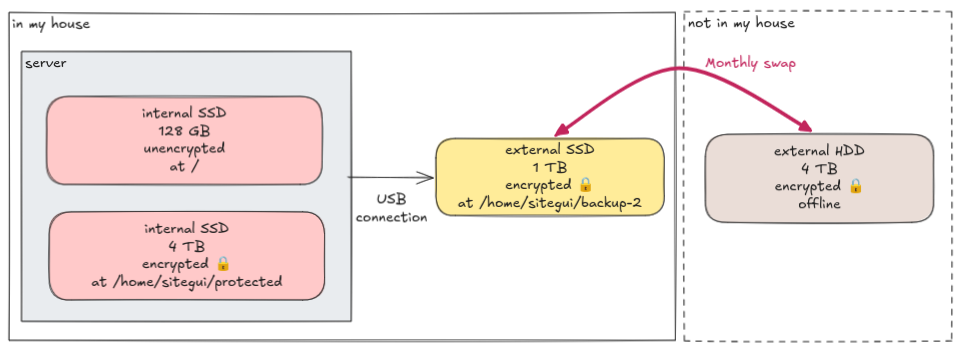
Note that the disks do not have the same size! That's simply because I was cheap and didn't want to buy yet another 4 TB SSD. In the future, I guess I'll do it, for simplicity. For now, I exclude big media files from the backup when the mounted disk is the one with 1 TB.
The daily timer
I'm using systemd to run most of the stuff on the server, including the backup logic. It is made of two files,
backup.timer that declares that it should run every day at 3 AM:
[Unit]
Description = Backup timer

[Timer]
OnCalendar = *-*-* 03:00:00
Persistent = true

[Install]
WantedBy = timers.target
and backup.service that describes that it should run the binary home-lab with the command "backup". It should also
retry up to three times if it fails.
[Unit]
Description = Backup
StartLimitIntervalSec = 12h
StartLimitBurst = 3

[Service]
WorkingDirectory = %h/home-lab
ExecStart = %h/home-lab/target/release/home-lab backup
Restart = on-failure
RestartSec = 60
A parenthesis about permissions: in my homelab, for simplicity, I'm running everything as the same user. So these files
are simply put in ~/.config/systemd/user/ and then I run these commands to enable it:
systemd --user daemon-reload
systemd --user enable backup.timer
However, for the backup to be able to read the files created by the containers that I run with podman, they must be
owned by that user. This means that I must correctly configure the user and group ids on the containers. This is still
very hard for me to understand. At this point, I mostly do it by trial and error. You can check in the
config folder
how I've configured each app. Look for the "UserNS" directive on each *.container file.
The backup script
I've started with a bash script, but it got too hairy, so I've switched to Rust. You can check the full implementation here, but I'll explain the steps here as well:
- try to mount encrypted disk 1 in
~/backup-1. If it fails, try to mount encrypted disk 2 in~/backup-2. I identify the disks by their UUIDs. - list all running containers with
podman container list. - for each running container, run
podman container inspectto grab the labelPODMAN_SYSTEMD_UNITwhich represents the name of the systemd service that owns it. Also, list all writable folder mounts. To illustrate, let's consider the prometheus service:
The container "prometheus" (from[Unit] [Container] ContainerName = prometheus Volume = %h/home-lab/config/monitoring/prometheus:/etc/prometheus:ro Volume = %h/bare/prometheus/data:/prometheus # ... other stuff ...ContainerName) is owned by the service "prometheus.service" (from the file name) and it has one writable folder mount at/home/sitegui/bare/prometheus/data. Note that read-only mounts are not considered here; it will become clear why later on. - for each service, do these steps (here illustrated with the same example above):
- stop the service with
systemd --user stop prometheus.service - backup each writable mount with
rsync:rsync --delete --archive --verbose \ /home/sitegui/bare/prometheus/data/ \ /home/sitegui/backup-1/bare/prometheus/data - list 1% of the files and check if the hashes of their contents match
- start the service with
systemd --user start prometheus.service
- stop the service with
- backup the main folders again, excluding the mounts already handled. This is were, where applicable, read-only mounts
will be backed up.
rsync --delete --archive --verbose \ /home/sitegui/bare \ /home/sitegui/protected \ /home/sitegui/backup-1 \ --exclude /bare/prometheus/data/ - list 1% of the files (excluding already checked paths) and check if the hashes of their contents match
- unmount backup disk
- send a push notification using Gotify. It's a silent notification if everything went okay, or a high-priority notification if some error happened
Final scores
- if I do something dumb, I want to recover that data: all data in
/home/sitegui/bareand/home/sitegui/protectedare copied usingrsync - if my machine breaks, I want to recover my data: the external disk connected to the server will have data at most 24 hours old
- if my house catches fire, I want to recover my data: the external disk stored offline in another address will have data at most 1 month old.
- if a stranger has access, they must not be able to access my data: (see the follow-up blog post)
- if ransomware compromises my server, they cannot erase my backups: the external disk stored offline cannot be erased
- if I'm not available, the system should work: using systemd timer and a script with robust error-handling is boring and reliable
- if the system has problems, I should be notified: push notification with the error message
- if the system silently stops running, I should notice: I'll notice that I have not received a push notification
- if data is inconsistent while the app is running, it must be stopped: services are stopped one by one before copying their files
- if a copied file rots, it should be identified: 1% of all files are checked every day
- if the writing patterns are similar, they should not fail at the same time: I'm using different technologies for the external disks (SSD vs HDD) and from different manufacturers, to reduce crash correlation
Test your backups
I use my PC to do a simulated worst-scenario exercise, in which I need to recover the whole system back from a backup. I create a new user in the PC and try to recreate the homelab in it. Sadly, I'm too lazy, and it's been more than a year since the last time I've done it! I should totally do it again. I'll do it mum, I promise.
Other approaches and FAQ
I could have used a dedicated backup strategy for Postgres like pg_dump to avoid turning it off, but I prefer one
single answer that should work for all containers and technologies.
I could have used some dedicated backup cloud service like BorgBase or use some cloud storage like S3. For 4 TB, BorgBase costs $ 24.50 / month, while S3 Glacier Deep Archive costs at least $ 3.96 / month. The actual S3 price will probably be much higher because of the caveats of glacier:
AWS charges for 40 KB of additional metadata for each archived object, with 8 KB charged at S3 Standard rates and 32 KB charged at (...) S3 Deep Archive rates. (...) S3 Glacier Deep Archive has a minimum storage duration of 180 days.
However, I don't want to depend on the cloud. Besides, uploading or downloading 4 TB of data would take too long. I could have used another friend as "the cloud". This would solve the cost issue, but I like the idea of having one offline backup.
I could have used RAID, but RAID is not backup: if you delete a file it will happily apply the destructive command to all copies! See goal number 1 :) Also, to reduce complexity and cost, I'm okay with the lack of high availability.
I could have used BTRFS to do disk snapshots, but I don't know enough about it. Maybe some day I learn and change it.
Achille (achilletoupin.com) at 2026-06-19 16:08 UTC
This post gave me ~~anxiety about~~ inspiration to fix my quasi-inexistent backup strategy
answer
No judgement! But a friend does not let one not do backups 🙃.
Start simple, but automated. A systemd timer and rsync into an external disk is cool.
(And I've also now enabled rendering of
strikehahah)answer
Achille (achilletoupin.com) at 2026-06-23 09:40 UTC
❤️