

Automated backups that work are mind-liberating! I've shared in the previous post how I back up my data. In this post I'll explore in detail how I handle encryption to protect my server and the insuing backup disks.
What does my system solve?
My encryption usage is meant to protect mostly against this threat:
if a stranger has access to any of my disks while they are unenergised, they must not be able to access my data.
For the backup disks this is rather simple to achieve by using full disk encryption with Linux Unified Key Setup (LUKS).
For the homelab's own disk, though, it's a different story: if I use full-disk encryption, I'll have to type in my
passkey during boot. But this doesn't work for me: when I'm not physically home, I still want to be able to boot
my server. That's why I'm using two partitions on the server: one unencrypted, with the OS and some base services, and
one fully encrypted, mounted at /home/sitegui/protected.
Note that this setup does not protect against intrusion and tampering with the OS! A malicious attacker with physical access to my server could modify the disk at rest to add a service that exfiltrates my passkey once entered. But I've ruled this threat as out of scope for my use case.
The server
In my specific hardware, I have two SSDs. I've manually configured during installation that the smallest one (128 GB) hosts the OS and the filesystem root, while the largest one (4 TB) is fully encrypted with LUKS. But if I had only one disk, I could split it during OS installation into two virtual volumes.
To mount the protected disk, I have to run these commands:
sudo cryptsetup open /dev/disk/by-uuid/b3898343-9627-4ef6-9a91-7c49d6690acb protected
# Type in the passkey
sudo mount /dev/mapper/protected /home/sitegui/protected
systemctl --user start protected.target
The UUID can be obtained with lsblk --fs and the passkey can be passed as the stdin for the script. The call to
systemctl starting the custom target "protected" is the one that tells all my other services that they can now start.
This is easy to do in systemd by creating a file ~/.config/systemd/user/protected.target with:
[Unit]
Description=Protected services
and then adding this section to every service that should not start on boot, but instead wait for the target to be explicitly started:
[Install]
WantedBy = protected.target
The unlock service
So that I can unlock my protected disk remotely, I run the OS and these services directly on the unencrypted partition:
- an HTTP API listening on a socket
~/host-api-socket/host-api.sock - a push notification service (Gotify)
- a reverse proxy (Caddy)
- a web server with a UI where I can type in my passkey, with the socket above mounted in
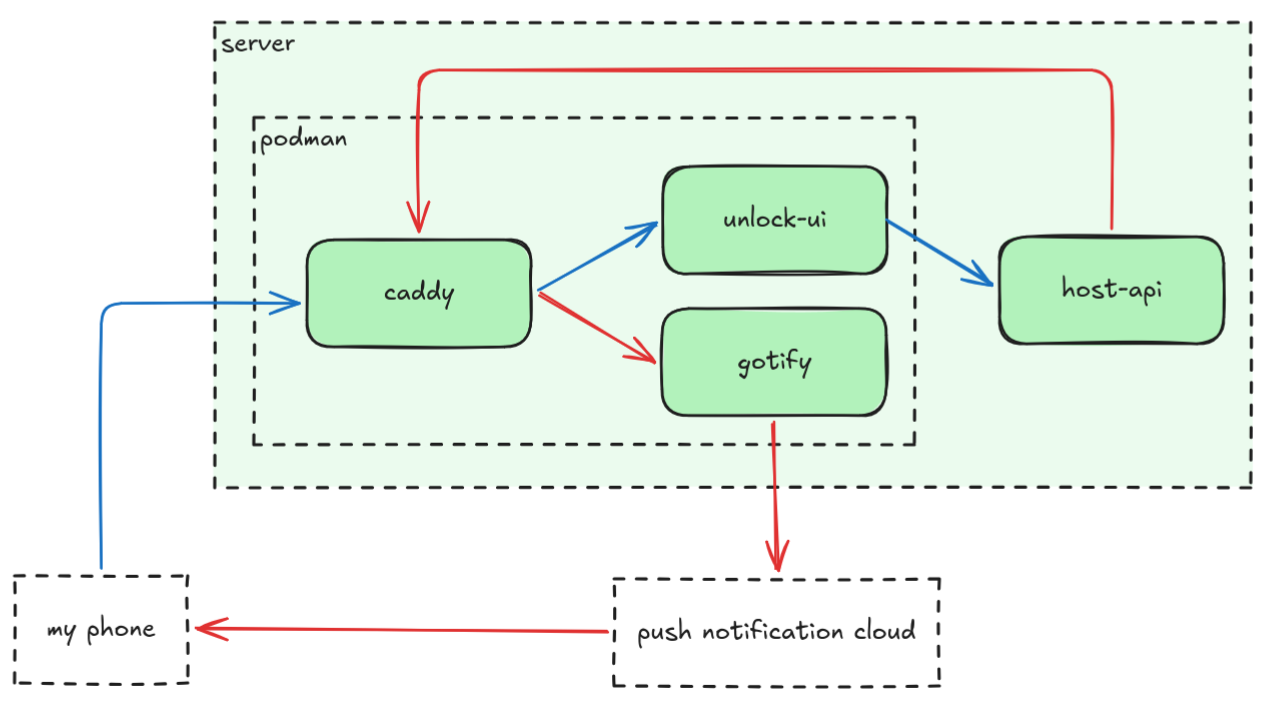
The first process ("host-api") runs directly on the host, not in a container. Mostly because I could not find a way to
do it... Look at the commands above that it uses and note that it needs to call cryptsetup and mount as root user,
and also systemctl --user, which requires access to the systemd bus. So to reduce the "surface" of connection between
the web server UI and the OS, the host-api process exposes an HTTP API in a socket that is mounted in the web server
container.
All the other 3 processes are running as rootless podman containers.
In the diagram above, I highlight two flows:
- the notification flow in red: when host-api starts, it probes the system to detect if the protected disk is alreay mounted. If not, it will send a push notification to my phone with a link to the unlock page.
- the unlock flow in blue: I got the page and enter the passkey, which gets passed to the host-api
I've searched for a way to mount the disk without requiring root privileges, but I could not find a suitable way to do it... So what I do instead is: I write just the commands that require sudo on a dedicated file and add this specific file to the sudoers of my user.
sitegui ALL=(ALL) NOPASSWD: /home/sitegui/sudo-scripts/mount-protected.sh
It's VERY important to protect these files with root-only privileges, otherwise a user could simply write any command to it.
sudo chown root:root /home/sitegui/sudo-scripts
sudo chown 700 /home/sitegui/sudo-scripts
This solution ended up being very useful for all sorts of administrative tasks, you can check in my home-lab git repo all scripts that use this mechanism.
A side-note: I also run other services on the unprotected partition. Services related to networking like Pihole and monitoring like Alert manager, Grafana, Prometheus, Node exporter and Podman exporter. This way, these essentials are running even before I unlock the main services.
The backup disks
I've prepared my two backup disks to use full-disk encryption with LUKS:
DEVICE=/dev/disk/by-uuid/87bbdbdf-47fd-4cc8-acae-83c97d5a6675
sudo cryptsetup luksFormat "$DEVICE"
sudo cryptsetup open "$DEVICE" temp
sudo mkfs.ext4 /dev/mapper/temp
sudo cryptsetup close temp

DEVICE=/dev/disk/by-uuid/9c34def1-550a-4746-bcd9-bba7eee241be
sudo cryptsetup luksFormat "$DEVICE"
sudo cryptsetup open "$DEVICE" temp
sudo mkfs.ext4 /dev/mapper/temp
sudo cryptsetup close temp

mkdir "$HOME/backup-1" "$HOME/backup-2"
However, note that the backup disks need to be mounted autonomously come backup time! So somehow somewhere the encryption key must be present. I've solved it by saving the encryption key to the disk itself, but of course in the protected mount:
sudo "$HOME/home-lab/config/mount-protected.sh"
PASSWORD_FILE="$HOME/protected/backup-password.txt"
nano "$PASSWORD_FILE" # enter password
ENCRYPTION_KEY=$(cat "$PASSWORD_FILE")
echo -n "$ENCRYPTION_KEY" > "$PASSWORD_FILE" # to remove trailing new line
chmod 0600 "$PASSWORD_FILE"
This is a bit silly and introduces a hole in the security: if an attacker has access to the file system, they may read this file and grab this credential, escalating access in time, if they have future access to my disks. Under normal operation, all exposed services use containers with explicitly mounted directories, so it's not visible to any container. Maybe in the future I’ll remove this file and store the key only in the memory of the host-api service.
Mounting the backup disks is then quite similar to unlocking the protected server disk:
cryptsetup open /dev/disk/by-uuid/87bbdbdf-47fd-4cc8-acae-83c97d5a6675 backup-1 \
  --key-file /home/sitegui/protected/backup-password.txt
mount /dev/mapper/backup-1 /home/sitegui/backup-1
(and similarly for backup-2)