

Well... There are trade-offs, but don't trash the idea just yet :)
Be assured that nobody is coming to take your beloved MongoDB, Postgres or other database away. They are marvellous piece of software that solve complex problems quite well. However, in this post I invite you to think what do you need them for, which problems they solve for your apps and, crucially, which problems they create on their own.
I got tangled in these questions while developing nidimages, a self-hosted app to share photos with family and friends. So I decided to write a synthetic load test to compare from different perspectives Postgres and a file-backed variable.
A file-backed variable
That's a fancy name for a rather dangerously-simple concept: you parse a file on startup, then you rewrite the file from time to time. Let's implement the gist of it in Python:
def main():
    database = json.loads(Path('data.json').read_text())

    def save_loop():
        while True:
            sleep(10)
            Path('data.json').write_text(json.dumps(database))

    Thread(target=save_loop).start()

    # continue backend startup logic
If reading the above code gave you some nausea ... good. The above "solution" is full of traps:
- what happens if the file is missing or ill-formed? crash!
- what happens if the process is shutdown during the sleep? data loss!
- what happens if the process is shutdown during the writing? full data corruption!
- what happens if you execute multiple instances of the code? data race and full data corruption!
- what happens if the
databasevariable is changed during the writing? data race and inconsistent data! - what happens if nothing change in the database? it gets fully rewritten every 10s nonetheless!
- what about data schema and schema migration? none!
Most of these problems can be solved with a better implementation and a language that gives more guarantees against data races. But the base concept stays the same: it's a variable that gets persisted on the disk automatically.
I'm going to use it as my main and only database, and nobody can stop me MUAHHAH
(some super-nerdy super-villain)
Suppose that it works. Why do it this way? Using a database app (like Postgres, MongoDB) or library (like Sqlite) requires writing your application is a certain way. There are tools that abstract the exact database technology, but they are always leaky in some way. If the data is already in memory, there is no need to quack like the database API mandates.
The database app
Let's step out of the madness for a while and back to a rather typical and simplified backend architecture. To improve system availability, specially during deploys, there are multiple running instances of each service.
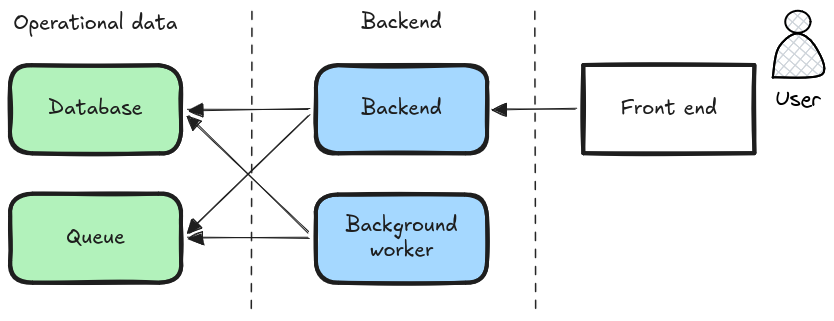
I invite you to think of the database as just an application. A specialised app of course, but just an app. An app that, notably, doesn't restart when you deploy new versions of the backend. An app that can scale independently. An app that exposes an API, usually receiving string query as input and binary format as output.
One may dismiss the idea of using a file as database as clearly limited. It doesn't "scale", says the intuition. Well, there is truth to that: using files is not feasible to have multiple machines writing on the same data. Even in the same machine, it's hard to have multiple processes writing to the same data.
Sqlite, DuckDB and RocksDB, for example, use a different model: they are not standalone apps. Instead, they reside inside your app and operate directly on files. They are powerful technologies, as long as your scale allows "same machine" processing.
It's the scale, darling
Even with a more rigours implementation, the file-backed variable suffers from a major limitation: it can only exist once, in a single process in a single machine. So this puts a hard ceiling on its scalability: you cannot overgrow a single node.
Even worse than that, you cannot use more than one process. So every deploy implies downtime: turn off the previous process, then turn on the new version.
For my use-case in nidimages, those two trade-offs are really okay. Also, I'm using Rust, that unlike Python and Node.js, can use multiple cores concurrently in the same process while safely sharing the file-backed variable among them. In other languages, the scale ceiling of a single core can be too much to bear.
But the burning question now becomes:
Which scale can this solution actually sustain?
To answer this as honestly as I can, I wrote two implementations of a simple backend app that allows users to create albums and publish photos in them. Then, I deployed these two versions in a cloud and wrote some code simulating many users:
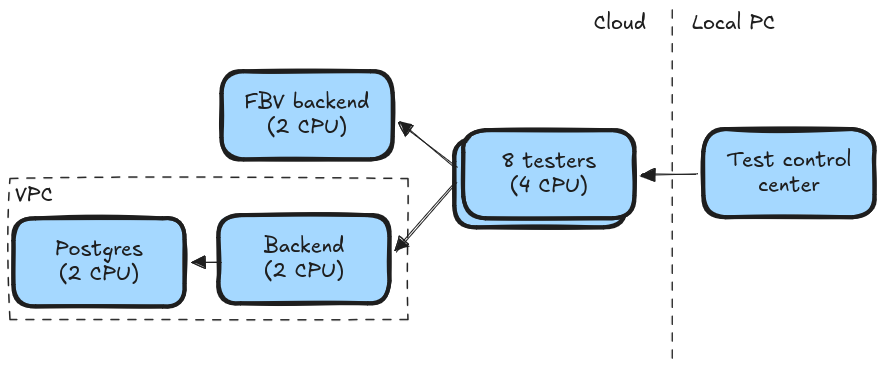
The service implements these HTTP endpoints:
- login (username) -> session
- list_albums (session) -> album[] (sorted by name)
- list_photos (session, album_id) -> photo[] (sorted by date)
- publish_photo (session, album_id, photo)
- take_notifications (session) -> notification[] (sorted by photo_date)
And has these SQL tables:
- user: (user_id UUID, username VARCHAR)
- album: (album_id UUID, name VARCHAR)
- user_album: (user_id UUID, album_id UUID)
- session: (session_id UUID, user_id UUID)
- photo: (photo_id UUID, album_id UUID, date TIMESTAMPTZ)
- notification: (notification_id UUID, user_id UUID, album_id UUID, photo_id UUID)
Or this database variable:
struct FileData {
    sessions: HashMap<Uuid, Session>,
    users: HashMap<Uuid, User>,
    albums: HashMap<Uuid, Album>,
}
struct User {
    id: Uuid,
    username: Box<str>,
    notifications: Vec<Notification>,
}
struct Album {
    id: Uuid,
    name: Box<str>,
    users: HashSet<Uuid>,
    photos: HashMap<Uuid, Photo>,
}
struct Session {
    id: Uuid,
    user: Uuid,
}
struct Photo {
    id: Uuid,
    date: DateTime<Utc>,
}
struct Notification {
    id: Uuid,
    album: Uuid,
    photo: Uuid,
}
You can read more details of the setup and the code in the database-architecture-load-tests repo.
Benchmark results
This first set of results compares the performance of 4 candidates:
- file-2c: file-backed variable with 2 CPUs
- file-4c: same but with 4 CPUs
- postgres-2c: postgres with 2 CPUs for the backend and 2 CPUs for the database
- postgres-4c: same but with 4 CPUs each
Each point in the charts below represent a test run. Before each, the application was preloaded with 10k users and 10k albums. Each album had a number of users and photos between 5k and 1, following Zipf's curve. Then 30 seconds of simulated load followed.
The horizontal axis shows the number of concurrent simulated user visits in each test run. A visit is a sequence of one
call to login, one to list_albums, one to list_photos, one to publish_photo 10% of the time and one to
take_notifications. Each call has a timeout of 1 second. If there is any problem during the visit, it is abandoned and
marked as failed.
There is no additional wait between the calls and the visits: once the backend answers, the simulated user immediate begins the next request. This is important, because it means that even "1 concurrent user" is already orders of magnitude more than my app will likely ever encounter!
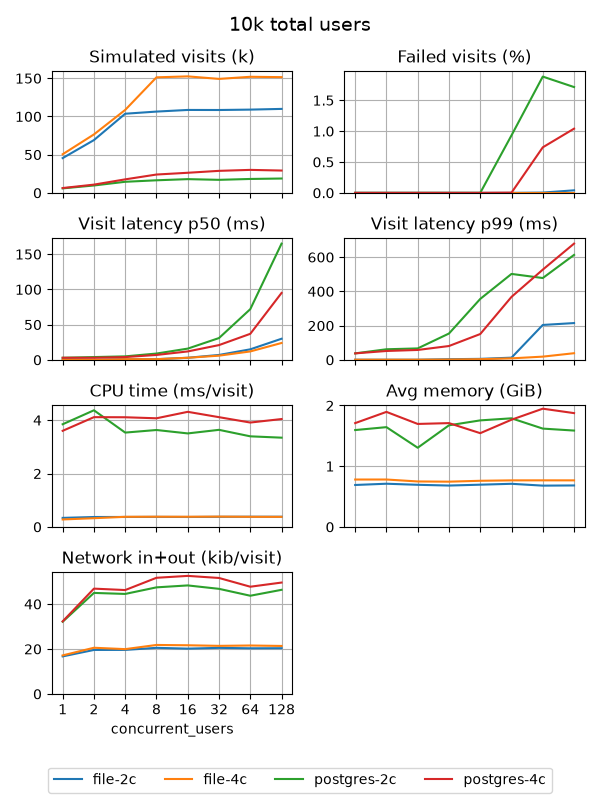
Or as a table view for the 1 concurrent user and 2 CPUs:
| candidate | file | postgres | ratio |
|---|---|---|---|
| simulated visits | 45.5 k | 5.9 k | 7.7x |
| failed visits | 0 % | 0 % | - |
| visit latency p50 | 0 ms | 3 ms | - |
| visit latency p90 | 1 ms | 38 ms | - |
| CPU time / visit | 0.34 ms | 3.85 ms | 11.3x |
| avg memory | 0.69 GiB | 1.60 GiB | 2.3x |
| network / visit | 16.7 kiB | 32.1 kiB | 1.9x |
- simulated visits (k): the total of simulated visits (with success or not) in the 30-second test run. Note that doubling the number of cores does not double the total of processed visits. This can be explained by the fact that writing and reading to the file-backed variable or the database requires some kind of locking mechanism, so with more concurrent visitors, contention increases, but not throughput
- failed visits (%): visits that had any call timeout after 1 second.
postgresis clearly close to the breaking point in the larger benchmarks - visit latency (ms): the median (p50) and 90th percentile time to answer the calls. It clearly increases with
concurrent load, due to the saturation effect of locks. Also,
postgresis larger thanfilebecause it's more complex to answer the calls. - CPU time (ms/visit): the total CPU execution time necessary to answer a visit
- avg memory (GiB): the average active memory usage during the 30-second test run.
- network in+out (kib/visit): the average number of bytes transited (in and out) of the machines to answer each visit
For postgres, the CPU time, memory and network are the sum of the values in both the backend and database machines.
So clearly, for this very simple app, 10 000 users with 128 concurrent ungodly-fast users is sustainable with file-backed variable: all requests are answered in less than 1 second and the app consistently uses less than 1 GiB of memory.
Scale up 10 times
Now the same idea, but with 100 000 users and using machines with 4 and 8 CPUs:
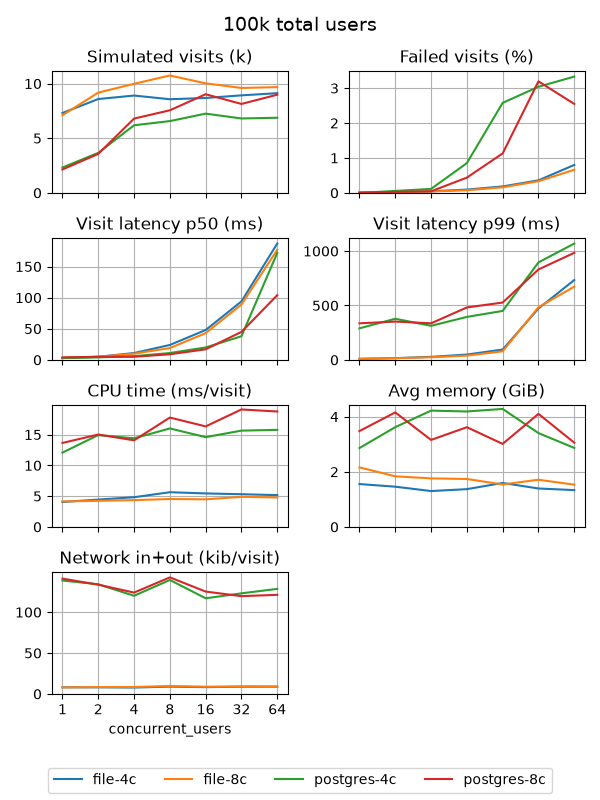
At this scale, the file-backed variable works well until 4 concurrent users, but starts to break apart after that. So this should leave plenty of space for my nidimages future!
Final words
It's important to state some trade-offs of the simplicity of the file-backed variable:
The ugly
- all your data is in memory. If your app uses large datasets, having it all in memory is not a good idea. For my own deployment of nidimages, I currently have a dozen albums and close to 20 000 photos, and the process uses less than 30 MiB, so I'm okay with that for now
- you have to build indexes and ensure uniqueness yourself. A database usually take care of that for you, so instead you are on your own. However, indexes are much less important, because iterating over millions of elements in memory is still very fast
- changing course is costly. If you app complexity grows, and you need to break it apart, the single variable models breaks. Refactoring to use a database will probably be painful. You can mitigate it by isolating the places in the code where you touch the database, but still...
The good
- types! In Rust, I can correctly type all my data and the compiler helps catch most misuse
- it is fast. As fast as expensive RAM can get, as few CPU instructions as you need
- it is operable. Running your app doesn't require any external dependency